 Yearsplit
- No account
- No tracking
- One purchase for all devices
Yearsplit
The budget planner for iPhone, iPad and Mac
Yearsplit brings your income and fixed costs together in one clear plan. It spreads yearly expenses such as insurance, memberships and subscriptions across the months, shows what remains each month and tells you how much to set aside. Plan on your own or with your partner – synced through iCloud, with no sign-up.



Expenses and income
Enter rent, insurance, subscriptions and income at their real interval: monthly, quarterly, half-yearly, yearly or every few months. For anything that is not monthly, Yearsplit also shows the monthly share; an annual bill, for example, counts towards each month with a twelfth of its amount.
- Expenses and income kept apart, with the monthly totals on the Overview
- Your own categories, and lists you can sort by amount and more
- Pause an item without deleting it

Monthly
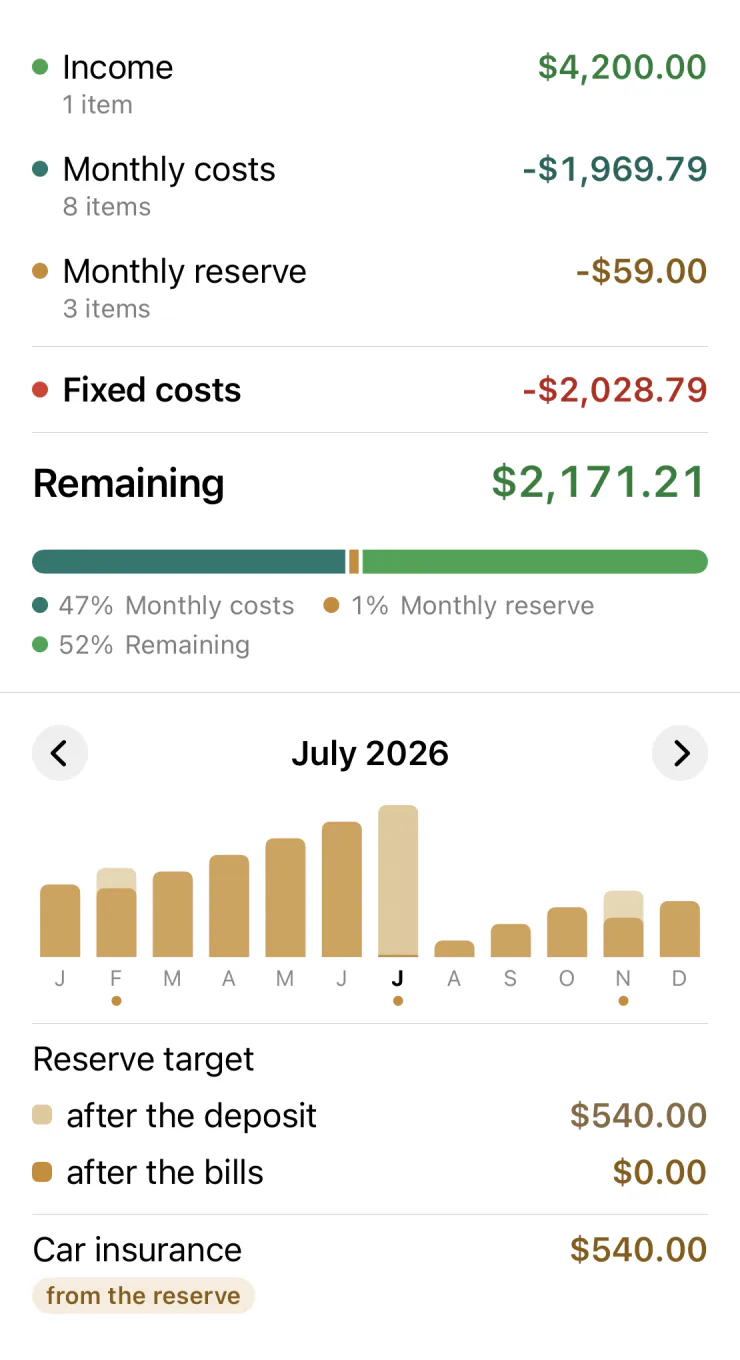
For each month, Yearsplit shows your income, the monthly costs and the monthly reserve for everything that isn’t due every month. Below that is what remains. The card also shows the reserve target for that month, before and after the bills.
Reserve
For the next twelve months, the reserve shows how much money should be set aside so that every bill is covered. A second line shows when the money would fall short without a one-time buffer; below it, the card says how large that buffer has to be.

The whole year at a glance
The Yearly view multiplies your monthly items by twelve and shows income, fixed costs and what remains for the whole year, so you see at once where your money goes over the year.
- Income, fixed costs and what remains per year, with the monthly figure beneath
- Spending by category, with its share and yearly amount
- All the bills due in the year: what has been paid and what is still due
- Switch between Monthly and Yearly at any time

Plan together
Share your budget with your partner, family or friends. Everyone sees and edits the same figures on their own device, and changes sync automatically.
There is no Yearsplit account and no Yearsplit server: sharing runs entirely through iCloud, and anyone who leaves keeps a copy of the data. With Family Sharing, one purchase covers the whole household. The guide explains joining, merging and leaving step by step.
- Turn on iCloud sync and choose Share with others.
- Send the invitation by Messages or Mail.
- Your partner opens the link and joins with their own Apple ID.
Privacy
Yearsplit needs no account and works fully offline. Protect the app with Face ID, sync through your own iCloud account if you like, and back up your data to a file at any time.
- App lock with Face ID, Touch ID or your device passcode – immediately or after a delay
- Optional iCloud sync between iPhone, iPad and Mac
- Export and import your data as a file
- No tracking and no advertising

One app for iPhone, iPad and Mac
A single purchase covers all your devices, with no subscription and no in-app purchases. On the Mac, Yearsplit is a native app with menus and keyboard shortcuts. It works with any currency, in 21 languages, and in light and dark appearance.
Frequently asked questions
Is Yearsplit an expense tracker?
No. Yearsplit plans regular costs such as rent, insurance and subscriptions. It does not connect to your bank and does not record individual purchases.
Do I need an account?
No. There is no sign-up. Sync and sharing use the Apple ID you already have.
How does my partner get the app?
With Family Sharing, your partner downloads Yearsplit at no extra cost. Without it, they get Yearsplit from the App Store with their own Apple ID.
Where is my data stored?
On your devices and, if you turn on sync, in your own iCloud account. The privacy policy has the details.
Which devices are supported?
iPhone and iPad with iOS or iPadOS 26 or later, and Mac with macOS 26 or later.
More answers on the support page.